Common Microwave Error Codes Explained
A microwave oven is a useful appliance in many homes. It helps heat leftovers, prepare quick meals, and save time in the kitchen. However, when the display suddenly shows an unfamiliar error code, it can be difficult to know what has gone wrong. Codes such as SE, F1, F2, H98, or C-20 may indicate anything from a control-panel problem to a sensor or internal electrical fault.
Understanding these messages can help you decide whether a simple reset is appropriate or whether your microwave needs professional attention. For homeowners in Saskatoon, knowing the difference can also help prevent unnecessary repairs and reduce the risk of using a faulty appliance.
This guide explains common microwave error codes, their possible meanings, safe troubleshooting steps, and signs that it is time to contact a qualified technician.
What Do Microwave Error Codes Mean?
Microwave error codes are messages generated by an appliance’s electronic control system. Modern microwaves contain sensors, switches, circuit boards, and safety mechanisms that monitor different functions.
When the control system detects an unusual condition, it may display a code to indicate the type of problem. For example, a code might relate to the temperature sensor, keypad, door system, or communication between electronic components.
However, error codes are not universal. The same code can have different meanings depending on the manufacturer and model. Always check your owner’s manual or the manufacturer’s official support information before deciding what a particular message means.
Some codes may disappear after a safe power reset, while others indicate a fault that requires professional diagnosis.
1. SE or 5E Error Code
The SE error code is commonly associated with certain Samsung microwaves. It may indicate a problem involving the touch keypad or a key that appears to remain pressed.
Sometimes, moisture, food residue, or dirt around the control panel can interfere with the buttons. In other cases, the keypad or its electronic connections may have developed a fault.
What should you do?
Start with these safe steps:
- Check whether any control-panel buttons appear stuck.
- Clean the exterior of the control panel using a soft, slightly damp cloth.
- Dry the surface thoroughly before reconnecting the appliance.
- If the manufacturer’s instructions permit it, disconnect power for approximately 60 seconds and reconnect it.
If the error returns, the keypad or another electronic component may need inspection. Do not remove the control panel or attempt to repair its wiring yourself.
Samsung notes that recurring error messages can require service, particularly when a power reset does not solve the problem.
2. F1 Error Code
An F1 code can indicate a problem with a temperature sensor or another internal component, depending on the microwave’s make and model.
In some appliances, the temperature sensor helps the control system monitor heat levels. If the sensor reading is missing or outside the expected range, the microwave may stop operating to protect itself.
Possible causes include:
- A faulty temperature sensor.
- Damaged electrical connections.
- A control-board problem.
- Excessive internal heat or an abnormal temperature reading.
How can you respond?
First, consult your owner’s manual to confirm what F1 means for your specific model. If the microwave has become unusually hot, stop using it and allow it to cool.
A reset may clear a temporary electronic fault, but it will not repair a defective sensor or damaged wiring. If the code remains or returns, arrange a professional inspection.
Do not open the microwave cabinet to check the sensor yourself. Internal components can present a serious electrical hazard even when the appliance is unplugged.
3. F2 Error Code
The meaning of F2 varies between manufacturers. On some microwave models, it is associated with a temperature-sensing fault. On certain Whirlpool over-the-range models, it can indicate a keypad or user-interface problem.
This difference is important because replacing the wrong component can waste both time and money.
Common symptoms
Depending on the model, you might notice:
- Buttons that do not respond properly.
- Unexpected beeping.
- Cooking cycles that stop before completion.
- An error that returns shortly after restarting the appliance.
What should you do?
Look up the code in the manual for your exact model. If the manufacturer recommends a power reset, follow its instructions.
If F2 returns, a technician can determine whether the issue involves the keypad, sensor circuit, wiring, or control board. Avoid buying replacement parts until the cause has been confirmed.
4. C-20, C-21, or C-22 Error Codes
These codes appear on certain Samsung microwaves and are generally associated with the temperature sensor system.
The sensor helps monitor temperature so the appliance can operate within its intended limits. A fault may occur when the sensor circuit is open, shorted, or reporting an abnormal reading.
C-21 may also be associated with an excessive-temperature condition on supported models.
Possible reasons
- A damaged temperature sensor.
- A fault in the sensor’s wiring.
- Excessive heat inside the appliance.
- A problem with the electronic control system.
Recommended action
If the microwave appears overheated, stop the cooking cycle and allow it to cool. If there is smoke, a burning smell, or evidence of a fire, disconnect power if it is safe to do so and do not use the appliance again until it has been assessed.
For other recurring temperature-related codes, follow the manufacturer’s instructions. Sensor faults generally require professional diagnosis rather than home repairs.
5. C-F0, C-F1, or C-F2 Communication Errors
Communication error codes on some microwaves indicate that electronic components are not exchanging information correctly.
Modern appliances rely on control boards and electronic interfaces to manage cooking functions, sensors, and user commands. When communication fails, the microwave may stop responding or display an error.
Potential causes include:
- A temporary electronic glitch.
- A damaged control board.
- A faulty connection between electronic components.
- Moisture affecting the control system.
Can a reset help?
A power reset may clear a temporary problem. However, it cannot repair a defective circuit board or damaged electrical connection.
If the code reappears after following the manufacturer’s reset instructions, stop troubleshooting and arrange professional service. Avoid repeatedly restarting an appliance that continues to report a fault.
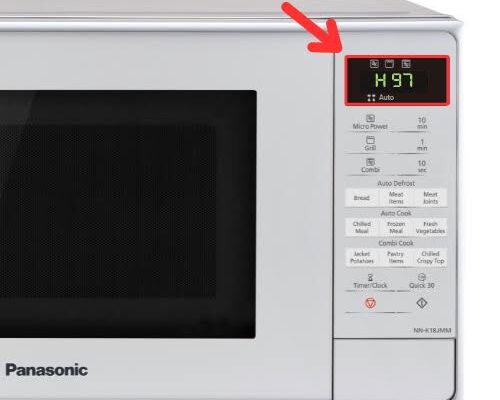
6. H97 or H98 Error Codes
Certain Panasonic microwave models use H97 or H98 to indicate a system malfunction that may involve the magnetron or inverter power system.
The magnetron produces the microwave energy used to heat food. The inverter circuit, where fitted, helps supply power to the heating system.
A fault in this area may cause the microwave to stop heating, interrupt a cooking cycle, or display an error message.
What should you do?
Do not attempt to test or replace the magnetron or inverter components yourself. These parts belong to the microwave’s internal high-voltage system.
Panasonic advises users to seek authorised service for relevant H-series system faults. Check the manufacturer’s guidance for your exact model, as code meanings can differ between product ranges.
7. PF or a Flashing Clock Display
PF commonly means that a power failure has occurred on supported microwave models. A flashing colon or clock may appear after a power interruption or when the appliance has been disconnected and reconnected.
This message does not necessarily mean that a component has failed.
What can you do?
- Check whether there has been a recent power interruption.
- Press the appropriate Cancel or Off button if instructed by the manual.
- Reset the clock.
- Check whether the microwave returns to normal operation.
If the display continues to flash or the power supply seems unstable, further investigation may be necessary. Whirlpool advises contacting a qualified electrician if certain power-related display symptoms persist.
8. Door-Related Error Codes
Some microwaves display a door-related error when the appliance cannot confirm that the door is properly closed.
The door system is an essential safety feature. Interlock switches help prevent the microwave from operating when the door is open.
Possible causes include:
- Food debris around the door opening.
- A damaged or misaligned latch.
- Worn door components.
- A faulty door switch.
- A problem with the switch wiring.
Safe troubleshooting steps
Check that no container, packaging, or food residue is preventing the door from closing properly. Clean accessible surfaces gently and close the door normally.
Do not slam the door, force the latch, or attempt to bypass the safety switches. If the door is damaged or the error continues, stop using the microwave until it has been inspected.
A microwave with a faulty door interlock should never be operated by defeating its safety mechanism.
9. Temperature, Humidity, and Steam Sensor Errors
Some microwaves include additional sensors for automatic cooking, reheating, grilling, or steam functions.
These sensors help the appliance adjust its operation according to the selected programme. When a sensor reports an abnormal reading, the microwave may display an error.
Possible symptoms include:
- Automatic cooking programmes failing to start.
- Cooking cycles ending unexpectedly.
- Sensor-based settings not working correctly.
- A code appearing during a particular cooking mode.
The cause might involve a sensor, its wiring, or the electronic control system. The exact meaning depends on the model.
Check the owner’s manual and clean only the accessible surfaces described in its instructions. If the error persists, a technician can test the relevant components safely.
10. Why Do Microwave Error Codes Keep Returning?
An error code that repeatedly appears usually deserves more attention than a message that disappears after a manufacturer-approved reset.
Common reasons for recurring errors include:
A defective component: A sensor, keypad, switch, or electronic board may have failed.
Moisture around the controls: Steam or spills can sometimes interfere with touch controls and electronic operation.
Electrical problems: Unstable power or damaged connections can affect an appliance’s performance.
Excessive heat: Blocked ventilation or an internal fault may cause overheating-related warnings.
Normal wear and tear: Older appliances may develop problems with their switches, sensors, and electronic components.
A reset can help identify a temporary issue, but it should not be treated as a permanent solution when the code returns.
Safe Troubleshooting Before Calling a Technician
Before arranging a repair, there are several useful steps you can take without opening the appliance.
Record the exact code
Write down the full message, including letters, numbers, dashes, and flashing symbols. A photograph of the display may also help.
Identify the make and model
Look for the model information on the label in the location specified by the manufacturer’s documentation. You can then find the correct manual and error-code list.
Check for simple obstructions
Make sure the door closes normally and that accessible ventilation openings are not blocked. Do not remove covers or panels.
Follow the manufacturer’s reset instructions
Some manufacturers recommend disconnecting power for a specified period. Only perform a reset when it is safe and consistent with the appliance’s instructions.
Stop if the fault persists
If the error returns, the microwave behaves unusually, or the problem involves the door or internal heating system, stop using it until the fault has been assessed.
Never open the microwave cabinet to investigate an error code. Internal high-voltage components, including the capacitor, can retain a dangerous electrical charge even after the appliance has been unplugged.
When Should Saskatoon Homeowners Arrange Professional Repair?
Professional diagnosis is appropriate when an error code returns after the recommended reset, the microwave stops heating, the control panel becomes unresponsive, or the door safety system appears faulty.
You should also stop using the appliance if you notice smoke, burning smells, sparks that are not explained by an obvious removable metal object, damaged electrical parts, or repeated circuit-breaker trips.
If you need help understanding a persistent error message, Microwave repair Saskatoon is a useful starting point for exploring repair assistance.
A technician can identify the code, inspect the relevant components, and explain whether repair is practical. Ask for a diagnosis and estimate before approving work, particularly if the microwave is older or requires an expensive electronic component.
For many homeowners, the best decision depends on the appliance’s age, condition, repair cost, and replacement price. A clear diagnosis helps you compare those options rather than guessing which part needs attention.
How Can You Reduce Future Microwave Problems?
Although not every fault can be prevented, good everyday habits may help reduce avoidable problems.
- Clean food spills promptly after the appliance has cooled.
- Keep the door, latch, and accessible control surfaces clean.
- Use microwave-safe cookware.
- Never operate the microwave empty unless the manufacturer specifically instructs otherwise.
- Keep ventilation openings clear.
- Avoid pouring water or cleaning products directly onto the control panel.
- Follow the owner’s instructions for cooking and cleaning.
- Arrange an inspection when unusual noises, repeated error messages, or performance changes occur.
Regular cleaning and correct use will not prevent every electronic failure, but they can help you spot developing problems earlier.
Frequently Asked Questions
1. What does an error code on a microwave mean?
An error code indicates that the microwave’s control system has detected an unusual condition. It may relate to the keypad, temperature sensor, door system, power supply, or another component. The exact meaning depends on the brand and model.
2. Can I reset my microwave to clear an error code?
Sometimes. Certain temporary electronic errors can clear after a manufacturer-approved power reset. If the code returns, the underlying problem may still be present and require professional diagnosis.
3. What does SE mean on a Samsung microwave?
On many Samsung models, SE indicates a key-related error involving the touch controls. Moisture or dirt may contribute, but a faulty keypad or electronic component is also possible. Check the instructions for your exact model.
4. What does F1 mean on a microwave?
F1 can indicate a temperature-sensor problem on some models, but meanings differ between manufacturers. Consult the owner’s manual before deciding what action to take.
5. Why does my microwave display F2?
The meaning of F2 depends on the microwave. It may relate to a keypad, user interface, or temperature-sensing circuit. Use the manufacturer’s code list to identify the correct meaning.
6. Is it safe to use a microwave with an error code?
It depends on the code and the appliance’s behaviour. If the error involves the door, overheating, electrical operation, or an unexplained malfunction, stop using the microwave until the issue is assessed.
7. What does PF mean on a microwave?
On many models, PF indicates that a power failure has occurred. The clock may need resetting. If the message continues or you suspect an electrical problem, consult the manufacturer’s guidance.
8. Why does my microwave error code keep coming back?
A recurring code may indicate a faulty sensor, keypad, switch, control board, or electrical connection. A reset may clear the display temporarily but will not repair a failed component.
9. Can I fix microwave error codes myself?
You can check the owner’s manual, clean accessible surfaces, remove obvious obstructions, and perform a manufacturer-approved reset. Internal electrical repairs should be left to qualified technicians because microwave components can retain dangerous electrical charges.
10. When should I replace my microwave instead of repairing it?
Consider replacement if the appliance is old, has several faults, requires an expensive repair, or has significant damage. Compare the repair estimate with the cost of a suitable replacement before making a decision.
Conclusion
Microwave error codes provide useful clues about problems affecting an appliance, but they do not always identify the exact failed component. Codes such as SE, F1, F2, H97, and PF can have different meanings depending on the manufacturer and model.
Start by checking the owner’s manual, recording the exact code, and following any safe troubleshooting instructions. If the error persists or the microwave shows signs of an electrical, heating, or door-safety problem, stop using it and seek professional advice.
For homeowners looking for further guidance, Microwave repair Saskatoon can help them explore repair options and take the next step toward resolving a persistent microwave fault.