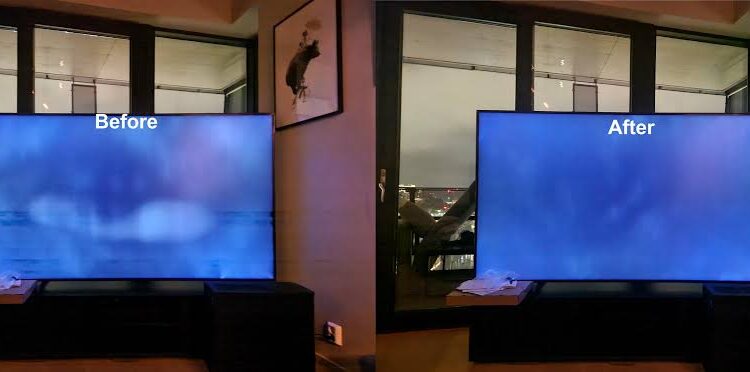
Have you noticed bright patches around the corners or edges of your television screen when watching a dark movie? Perhaps the screen looks slightly grey instead of black, even when the room lights are switched off. These symptoms may indicate a problem commonly known as backlight bleed.
Backlight bleed is a display issue most often associated with LED and LCD televisions. It can make dark scenes look uneven and reduce the viewing experience, especially for people who enjoy watching movies in a dimly lit room. However, not every bright patch means your television is damaged or needs repair.
For Saskatoon homeowners, understanding the causes of backlight bleed can help determine whether simple picture adjustments are enough or whether professional inspection is worthwhile. This guide explains how to recognise the problem, what causes it, and which solutions are available.
1. What Is TV Backlight Bleed?
Backlight bleed occurs when light from an LCD television’s backlight becomes visible unevenly around the edges or corners of the screen. It often appears as white, grey, yellowish, or bluish patches against dark backgrounds.
Unlike OLED televisions, which produce light directly from individual pixels, LCD televisions rely on a separate light source behind the display panel. Liquid crystals control how much light passes through to create the picture.
The backlight and panel layers are designed to distribute light as evenly as possible. However, small variations in the panel assembly, light-diffusing layers, or frame pressure can create areas where more light becomes visible.
Backlight bleed is generally easiest to notice when watching dark scenes in a dark room. A faint glow visible on a completely black screen may be less noticeable during normal viewing.
According to Sony’s television support guidance, uneven brightness can be a characteristic of LCD technology rather than evidence of a malfunction.
2. What Does Backlight Bleed Look Like?
The appearance varies from one television to another. Some screens show a small bright area near a corner, while others display uneven illumination along an entire edge.
Common signs include:
- Bright corners: One or more corners appear lighter than the rest of the screen.
- Light along the edges: A thin strip of white or grey illumination becomes visible around the bezel.
- Cloudy patches: Dark areas appear uneven, with grey or pale patches across the display.
- Uneven black levels: Black scenes look grey in certain areas rather than uniformly dark.
- Bright areas during movies: Dark scenes reveal distracting patches that are less noticeable in brighter content.
These symptoms are not always caused by backlight bleed. Local dimming effects, reflections, viewing-angle characteristics, and other display issues can produce similar appearances.
Before arranging a repair, observe whether the bright areas remain in the same location across different programmes and picture sources. This can help distinguish a persistent display characteristic from a problem with the content or connected device.
3. What Causes Backlight Bleed?
Several factors can contribute to uneven illumination. Identifying the likely cause is important because some conditions can only be reduced, while others may justify warranty service or component replacement.
Manufacturing variations
LCD panels contain several carefully aligned layers. Minor differences in assembly or the distribution of pressure around the panel can affect how evenly light passes through the display.
Some variation is normal. However, unusually bright or distracting patches may be unacceptable to the owner, particularly if they are visible during everyday viewing.
Pressure on the screen or frame
Uneven pressure around the television’s bezel can sometimes change how light passes through the panel layers. This may happen because of assembly characteristics, physical impact, or inappropriate handling.
Avoid pressing the screen or attempting to bend the frame to correct the problem. LCD panels are delicate, and applying pressure can create additional damage.
Backlight design
The arrangement of the LEDs can influence screen uniformity. Edge-lit televisions position their light sources around the edges, while direct-lit and full-array designs place light sources behind the panel.
Different designs distribute light differently, and none guarantees perfect uniformity in every scene. The result also depends on the quality and construction of the individual television.
Age and component changes
As a television ages, its backlight components and optical layers may change. Uneven brightness can become more noticeable if certain components age differently from others.
However, backlight bleed does not automatically mean the television is old or failing. A relatively new television can also show uneven illumination.
Excessive brightness settings
A high backlight level can make existing light leakage much more noticeable, particularly in a dark room. Lowering the setting may improve the viewing experience without requiring any physical repair.
4. Is Backlight Bleed the Same as Clouding or Blooming?
These terms are sometimes used interchangeably, but they can describe different display behaviours.
Backlight bleed usually refers to unwanted light visible near the screen’s edges or corners.
Clouding describes broader, cloudy areas of uneven brightness across the screen. It may overlap with what people call backlight bleed.
Blooming commonly occurs when bright objects appear against dark backgrounds on televisions with local dimming. A bright object may have a visible halo because nearby backlight zones cannot always control light precisely around it.
IPS glow is a viewing-angle effect associated with certain LCD panel types. The glow may change significantly when you move to a different viewing position.
Correctly identifying the symptom helps prevent unnecessary repairs. For example, lowering the brightness may make backlight bleed less noticeable, while blooming may respond to local-dimming settings. A genuine panel defect may require a different solution.
5. How Can You Check Whether Your TV Has Backlight Bleed?
You can perform a basic visual check without opening the television or using specialist equipment.
Step 1: Choose a dark scene.
Play a movie or programme containing dark backgrounds. You can also display a black image, although a completely black test screen may make minor variations look more dramatic than normal viewing does.
Step 2: Use your usual viewing position.
Sit where you normally watch television. Look for bright patches that remain in the same area of the screen.
Step 3: Check the room lighting.
Observe the display under your usual lighting conditions. A faint patch that appears only in a completely dark room may have little effect on your everyday viewing experience.
Step 4: Adjust the picture settings.
Reduce the backlight or panel brightness setting slightly and see whether the patches become less noticeable. The exact setting names vary by manufacturer and model.
Step 5: Compare different content.
Try a dark movie, a regular television programme, and a bright scene. If the issue appears only in specific content, consider whether the content itself or the display’s local-dimming behaviour contributes to the effect.
Do not judge the television solely from a photograph taken in a dark room. Camera exposure can exaggerate screen imperfections, making the problem look more severe than it appears to the naked eye.
6. Can Backlight Bleed Be Fixed at Home?
In many cases, you can reduce the visibility of backlight bleed through picture adjustments. However, settings cannot physically correct a panel that has genuine light leakage caused by its construction or damage.
Try these adjustments first:
Reduce the backlight level
Open your television’s picture settings and lower the backlight level. Some models use terms such as panel brightness or screen brightness. Choose a level that preserves comfortable picture quality without making the image unnecessarily dim.
Choose a suitable picture mode
Standard, Cinema, or Movie modes may offer a more comfortable image than a very bright showroom setting. The available modes and their effects differ by model.
Enable the light sensor
If your television has an ambient light sensor, enabling it may allow the screen to adjust brightness according to the room’s lighting conditions.
Adjust local dimming
On compatible televisions, local dimming settings may improve dark-scene performance. Experiment with the available options, as the best setting depends on the model and your preferences.
Improve room lighting
Watching television in a completely dark room can make minor brightness variations more obvious. Gentle ambient lighting may reduce their visual impact without requiring changes to the hardware.
These steps can improve the viewing experience, but they do not guarantee that the underlying issue will disappear.
7. Should You Press the Screen or Adjust the Screws?
No. Pressing the screen, massaging bright areas, heating the panel, or randomly tightening or loosening screws is not recommended as a home repair method.
Although pressure around an LCD panel can influence light uniformity, applying force in the wrong place may damage the liquid-crystal layers, break the panel, or create new bright spots.
Opening the television can also expose delicate components and electrical hazards. It may affect warranty coverage depending on the manufacturer’s terms.
If the bright areas are severe, remain visible during normal viewing, or appeared after the television was dropped or moved, arrange a professional assessment instead of experimenting with the panel.
8. When Does Backlight Bleed Require Professional Repair?
Professional assessment may be appropriate when the light leakage significantly affects your viewing experience or is accompanied by other symptoms.
Consider seeking help if:
- Bright patches are visible during ordinary programmes, not just black test screens.
- Uneven illumination has become noticeably worse.
- The television has suffered an impact or physical damage.
- Bright areas appear alongside flickering, lines, or other picture faults.
- The television is relatively new and the problem may qualify for warranty support.
A technician can inspect the display and determine whether the issue appears consistent with normal panel characteristics, uneven assembly pressure, damaged components, or another fault.
The available repair options depend on the model and the diagnosis. Some issues may be addressed through adjustments or suitable component servicing, while severe panel-related problems may require an expensive display replacement.
9. Is It Worth Repairing a TV With Backlight Bleed?
The answer depends on how severe the problem is, how old the television is, and what the repair would cost.
If the issue is minor and picture adjustments make it difficult to notice, professional repair may not be necessary. Continuing to use the television is reasonable if the picture remains satisfactory and no other faults are present.
If the display is seriously affected, request an estimate before approving work. Panel replacement can be expensive, and suitable parts may not be available for every model.
Compare the estimated repair cost with the price of a similar replacement television. Also consider the screen size, picture quality, features, age, and condition of your current set.
If the television is still under warranty or was purchased recently, contact the retailer or manufacturer before paying for a third-party repair. Keep your proof of purchase and, if useful, photographs showing the issue under normal viewing conditions.
10. How Can You Reduce the Risk of Screen Problems?
Backlight bleed is not always preventable, especially when it results from manufacturing variations. Nevertheless, careful handling can reduce the risk of physical damage.
- Use a suitable mount or stand that supports the television’s weight.
- Follow the manufacturer’s instructions when mounting or moving the set.
- Avoid applying pressure directly to the display.
- Keep the television away from conditions outside its recommended operating environment.
- Use appropriate picture settings for your room.
- Protect the screen during transport and avoid gripping it by the display surface.
If you notice a new bright patch after moving or mounting the television, avoid pressing the area to see whether it changes. Document the symptom and seek advice if it persists.
For homeowners looking for TV repair Saskatoon, describing the location of the bright patches, when they first appeared, and whether they affect normal programmes can help explain the issue when requesting service.
Frequently Asked Questions
Is a small amount of backlight bleed normal?
Some uneven illumination can be a normal characteristic of LCD technology, particularly when viewing a blank screen or dark content in a dim room. Whether it is acceptable depends on how noticeable it is during normal use and the manufacturer’s specifications.
Does backlight bleed get worse over time?
Not necessarily. Some cases remain stable, while changes in components, physical pressure, or other factors can affect screen uniformity. A sudden or substantial change deserves further investigation.
Can changing brightness permanently fix backlight bleed?
No. Lowering brightness can reduce how visible the light leakage is, but it does not physically repair a panel defect.
Do OLED TVs suffer from traditional backlight bleed?
OLED televisions do not use a separate backlight, so they do not suffer from traditional LCD backlight bleed. However, OLED displays can have other types of screen uniformity or image-related issues.
Should I replace my television because of backlight bleed?
Not automatically. If the issue is mild and does not interfere with viewing, you may not need to do anything beyond adjusting the picture settings. If it is severe, compare the repair estimate with the cost of replacement.
Conclusion
Backlight bleed can make dark scenes look uneven and distract from an otherwise enjoyable television experience. It is most common as a visible characteristic of LCD technology, although severe light leakage or changes in screen uniformity can sometimes indicate a problem that deserves attention.
Start with sensible picture adjustments and evaluate the display under normal viewing conditions. Avoid pressing the screen or attempting risky internal repairs. If the problem is persistent, severe, or accompanied by other display faults, professional diagnosis can help establish whether repair is practical.
Understanding the difference between normal screen variation and a genuine fault allows homeowners in Saskatoon to make a more informed decision about maintaining, repairing, or replacing their television.