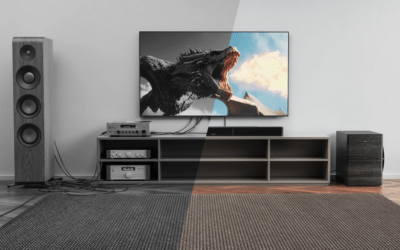
Audio equipment is designed to deliver clear, reliable sound, but its performance can be affected by the environment in which it operates. Humidity, temperature changes, condensation, and poor ventilation can all influence the condition of speakers, amplifiers, receivers, soundbars, and other electronic devices.
In Saskatchewan, where winters can be extremely cold and indoor heating is often necessary for long periods, protecting audio equipment requires some attention. Although the province is known for its dry winter conditions, humidity can still become a problem during warmer months, in damp basements, near humidifiers, or when equipment is moved between cold outdoor conditions and warm indoor spaces.
Moisture does not always cause immediate equipment failure. Sometimes, it contributes to crackling sounds, corroded connections, intermittent operation, or gradual deterioration of internal components.
Understanding how humidity affects audio equipment can help you prevent damage, maintain sound quality, and avoid unnecessary repair expenses. This guide explains the risks, warning signs, and practical steps Saskatoon residents can take to protect their audio systems throughout the year.
1. Understanding Humidity and Its Effect on Electronics
Humidity refers to the amount of water vapour present in the air. Relative humidity, commonly expressed as a percentage, indicates how much moisture the air contains compared with the maximum amount it could hold at a particular temperature.
Both excessively high and excessively low humidity can affect audio equipment, although high moisture levels and condensation generally present the more direct risk of water-related electrical damage.
High Humidity
When the air contains considerable moisture, sensitive electronic components may be exposed to conditions that encourage corrosion, leakage currents, and deterioration of certain materials.
High humidity does not automatically damage every electronic device. The risk depends on factors such as temperature, exposure duration, ventilation, contaminants, and the equipment’s design.
Low Humidity
Dry air is common in heated homes during Saskatchewan winters. Low humidity can increase static electricity, particularly when people walk across carpets or handle equipment without first discharging static.
Electrostatic discharge can damage sensitive electronic components, especially when circuit boards or connectors are exposed during servicing.
Low humidity can also contribute to discomfort and static-related interference, although it does not normally cause the same corrosion risks associated with persistent moisture.
Condensation
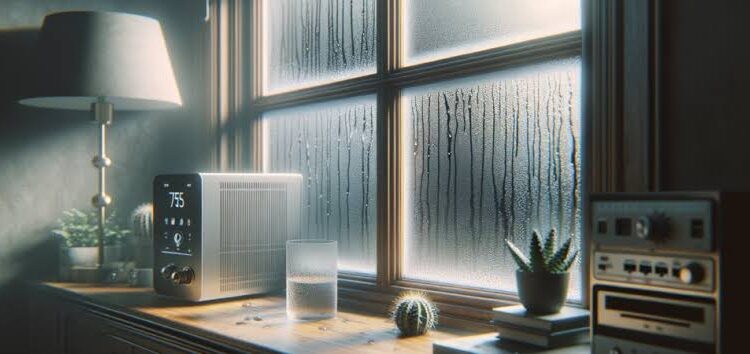
Condensation occurs when a surface becomes colder than the surrounding air’s dew point, allowing water vapour to form liquid droplets.
This is particularly important during Saskatchewan’s colder months. If a receiver, speaker, or amplifier is brought indoors from a freezing vehicle, moisture may form as the equipment warms up.
The key lesson is that humidity alone is not the only concern. Sudden temperature changes can create condensation even when the indoor air does not feel especially damp.
2. Why Saskatchewan’s Climate Requires Special Attention
Saskatchewan experiences substantial seasonal temperature changes. These conditions can affect audio equipment stored in garages, vehicles, basements, and rooms with inconsistent heating.
Cold Winters and Heated Indoor Spaces
During winter, outdoor air can be very cold and contain little moisture. When that air enters a heated building, its relative humidity often drops.
As a result, indoor environments may become dry enough to increase static electricity. This can be particularly relevant when handling exposed electronic components or connecting sensitive equipment.
The more serious risk occurs when cold equipment is brought directly into a warm room. Moisture may condense on cold surfaces, including internal components that are not immediately visible.
Summer Humidity and Damp Locations
Although Saskatchewan often has a relatively dry climate, humid periods still occur. Indoor moisture can also increase because of cooking, showering, inadequate ventilation, water leaks, or the use of humidifiers.
Basements may be especially vulnerable if they have poor ventilation or moisture problems.
Audio equipment kept in a damp basement may experience corrosion over time, particularly if dust and airborne contaminants collect around its connectors and circuit boards.
Garages, Sheds, and Seasonal Storage
An unheated garage or shed can expose audio equipment to wide temperature fluctuations. These changes may encourage condensation and place stress on materials, connections, and mechanical components.
If you store vintage receivers, speakers, or turntables in these locations, consider moving them to a clean, dry indoor environment.
3. How Humidity Affects Different Types of Audio Equipment
Different audio devices have different vulnerabilities. Knowing which parts are at risk can help you identify potential problems early.
Amplifiers and AV Receivers
Amplifiers and receivers contain circuit boards, connectors, power supplies, and other electronic components.
Persistent moisture can contribute to corrosion on metal contacts and solder joints. In severe cases, moisture combined with dust or other contaminants can create unwanted electrical paths that interfere with normal operation.
Possible symptoms include:
- Intermittent power.
- Unexpected shutdowns.
- Crackling or buzzing.
- Unreliable input connections.
- Distorted audio.
- Failure to produce sound.
These symptoms can have several causes, so they should not automatically be attributed to humidity.
If a receiver begins behaving unusually after exposure to moisture, switch it off and disconnect it from power if it is safe to do so. Do not continue testing it while damp.
Speakers and Subwoofers
Speakers contain electrical and mechanical components that may respond differently to environmental conditions.
High humidity can affect certain cone materials, adhesives, surrounds, and internal metal components over time. The exact effect depends on the speaker’s construction and the amount and duration of exposure.
Moisture can also contribute to corrosion at speaker terminals, potentially causing weak connections or intermittent sound.
Subwoofers may be particularly vulnerable when placed directly on a damp basement floor. Raising them off the floor and maintaining adequate ventilation can reduce exposure to moisture.
Soundbars and Wireless Speakers
Soundbars often contain several drivers, amplifiers, wireless modules, and control circuits within one enclosure.
Their compact construction can make internal inspection difficult. If moisture reaches the electronics, the problem may affect several functions at once.
Wireless speakers can also develop charging or connection problems if their contacts become corroded.
Do not assume that a water-resistant rating makes a device safe from every type of moisture exposure. Water resistance varies by model and does not necessarily protect against condensation, prolonged dampness, or liquid entering through damaged seals.
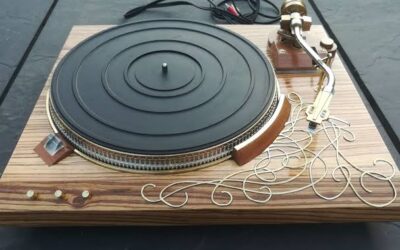
Turntables and Vintage Audio Equipment
Vintage record players may contain mechanical linkages, motors, switches, wiring, and electronic circuits.
Humidity can contribute to corrosion on metal parts, while damp storage may affect wooden cabinets, rubber components, and certain adhesives.
Moisture-related deterioration can also complicate restoration because replacement parts may be difficult to find.
For valuable vintage equipment, maintaining a stable environment is usually safer than attempting to correct damage after it occurs.
4. Warning Signs That Moisture May Be Affecting Your Audio System
Humidity-related damage is not always obvious. In some cases, the first signs are small changes in performance.
Watch for the following symptoms.
Crackling or Intermittent Sound
Crackling can result from dirty connectors, damaged cables, faulty switches, failing components, or corrosion.
If the sound becomes intermittent after equipment has been stored in a damp area, moisture may be a contributing factor.
However, crackling alone does not confirm humidity damage.
Humming or Buzzing
Unusual humming may be associated with grounding problems, electrical interference, damaged connections, or internal faults.
Moisture-related corrosion can sometimes contribute to connection problems, but the source needs to be identified before any repair is attempted.
Difficulty Powering On
A device that fails to power on may have a power supply fault, damaged switch, loose connection, or internal electrical damage.
If the problem follows exposure to moisture or condensation, stop using the equipment until it has been assessed.
Corrosion on Connectors
Visible green, white, or dark deposits around metal connectors may indicate corrosion or contamination.
Do not scrape connectors aggressively or spray household cleaning products into the equipment. Incorrect cleaning methods can damage delicate contacts and coatings.
Unusual Odours or Overheating
A burning smell, smoke, sparks, or unusual overheating should be treated seriously.
Switch off the equipment and disconnect power if it is safe to do so. Do not open the unit or attempt to operate it again until the problem has been investigated.
5. How to Protect Audio Equipment From Humidity
Prevention is generally less expensive than repairing damaged electronics. A few practical habits can help protect audio equipment in Saskatoon homes.
Maintain a Stable Indoor Environment
Try to keep audio equipment in a room with reasonably stable temperature and humidity.
For many household environments, a relative humidity level around 30% to 50% is a practical general target, provided it is compatible with the equipment manufacturer’s recommendations and the building itself.
A basic digital hygrometer can help you monitor conditions. Avoid assuming that the humidity in one room represents the conditions throughout the house.
If you use a humidifier during winter, position it away from speakers, receivers, turntables, and other electronics. Do not allow mist to settle directly on equipment.
Improve Ventilation
Amplifiers and receivers generate heat and require adequate airflow. Placing them inside tightly enclosed cabinets can trap warm, humid air and encourage condensation under certain conditions.
Keep ventilation openings clear and follow the manufacturer’s recommendations for clearance around the device.
Avoid positioning equipment directly beside radiators, heating vents, humidifiers, or windows where condensation frequently forms.
Keep Equipment Off Damp Floors
Basements can be convenient places for home theater systems, but moisture may accumulate near concrete floors and exterior walls.
Use stable shelving or suitable stands to keep equipment away from damp surfaces. Ensure that cables and power connections are not exposed to leaks or standing water.
If the basement regularly feels damp, investigate the source rather than relying only on a dehumidifier.
Store Equipment Correctly
If you need to store a receiver, speaker, or turntable for an extended period, choose a clean, dry location with relatively stable temperatures.
Avoid storing equipment in a shed or garage where it may experience repeated freezing and warming cycles.
Protect equipment from dust, but do not wrap a damp device in an airtight covering. Trapped moisture may remain inside and worsen corrosion.
Allow Cold Equipment to Acclimatise
If you transport audio equipment during winter, allow it to warm gradually to room temperature before connecting it to power.
Keep it switched off and unplugged during this period. Larger equipment may need several hours to acclimatise, depending on how cold it became and how much material it contains.
If condensation is visible or suspected inside the unit, do not power it on simply because the exterior feels dry. Internal moisture may take longer to dissipate, and professional assessment may be necessary.
6. What to Do If Your Audio Equipment Gets Wet
If a spill, leak, or condensation affects your audio equipment, take the following precautions.
1. Disconnect power safely. If the equipment is wet near its power connection, do not touch it while standing in water or in an unsafe environment. Shut off the power at the appropriate source if necessary and safe.
2. Stop using the device. Do not repeatedly switch it on to see whether it still works. Applying power while moisture is present can cause additional damage.
3. Avoid opening the enclosure. Amplifiers and receivers may contain hazardous voltages, including components that retain a charge after unplugging.
4. Do not use direct heat. Hair dryers, heaters, and heat guns can damage plastics, adhesives, speaker components, and circuit boards.
5. Arrange an assessment. A qualified technician can inspect the equipment, identify corrosion or liquid damage, and determine whether cleaning or component replacement is necessary.
Drying the exterior does not guarantee that the internal electronics are safe. Prompt, appropriate assessment may improve the chances of a successful repair.
7. Can Humidity Damage Be Repaired?
In many cases, moisture-related audio faults can be repaired, but the outcome depends on the severity of the damage.
Minor Connector Corrosion
If corrosion is limited to accessible connectors, suitable cleaning or connector replacement may restore reliable operation.
The correct method depends on the connector material and the type of contamination.
Circuit Board Corrosion
When moisture reaches a circuit board, a technician may need to inspect solder joints, component leads, conductive paths, and nearby parts.
Cleaning may be sufficient in some cases, while extensive corrosion may require component replacement or more involved board-level repair.
Speaker or Driver Damage
If moisture has affected a speaker cone, surround, voice coil, or internal connections, repair options depend on the component design and availability of suitable replacement parts.
Some speakers can be repaired by replacing individual components. Others may be more economical to replace.
Repair Versus Replacement
Before approving extensive work, compare the repair estimate with the price of a comparable replacement.
Consider the equipment’s age, performance, availability of parts, and sentimental or collector value. A vintage receiver may justify specialist restoration even when a newer budget device would be cheaper to replace.
For homeowners seeking Audio repair Saskatoon, professional diagnosis can help determine whether moisture has caused a repairable fault and what the next steps may involve.
8. Seasonal Audio Equipment Care in Saskatoon
A simple seasonal routine can reduce environmental risks throughout the year.
Winter: Monitor indoor humidity, reduce static risks when handling exposed components, and allow cold equipment to acclimatise before use.
Spring: Check basements and storage areas for signs of moisture after seasonal temperature changes. Inspect equipment stored near exterior walls.
Summer: Pay attention to humid periods, poor ventilation, and damp locations. Keep equipment away from open windows if rain or condensation may reach it.
Autumn: Prepare equipment storage areas before colder weather arrives. Inspect cables, shelves, and ventilation, and move valuable equipment out of unheated spaces.
Throughout the year, clean external surfaces gently and follow the manufacturer’s maintenance recommendations.
9. When Should You Contact an Audio Repair Technician?
Some environmental problems can be prevented through better storage and ventilation. However, symptoms that persist after the equipment has been kept in a suitable environment may indicate an internal fault.
Consider professional assistance if:
- Audio cuts in and out repeatedly.
- Connectors show significant corrosion.
- A receiver will not power on.
- The system shuts down unexpectedly.
- Sound becomes distorted across multiple sources.
- Equipment has been exposed to liquid.
- You notice burning smells, smoke, or unusual heat.
- A valuable vintage device requires internal cleaning or restoration.
When describing the problem, tell the technician where the equipment was stored, whether it experienced a temperature change, and whether any liquid exposure occurred.
This information can help narrow down possible causes without assuming that humidity is responsible for every fault.
Conclusion
Humidity can affect audio equipment through corrosion, material deterioration, and moisture-related electrical problems. In Saskatchewan, the combination of cold winters, heated indoor spaces, seasonal humidity, and temperature changes makes sensible storage and handling particularly important.
Keep your equipment in a stable indoor environment, maintain adequate ventilation, monitor damp areas, and avoid powering on devices that may contain condensation. These simple precautions can help extend the useful life of speakers, soundbars, amplifiers, receivers, and vintage record players.
If an audio system develops persistent problems after moisture exposure, do not rely on repeated testing or household cleaning methods. A professional assessment can help identify the cause, protect against further damage, and determine whether repair is worthwhile.
Frequently Asked Questions
1. Can high humidity damage audio equipment?
Yes. Prolonged exposure to high humidity can contribute to corrosion, deterioration of certain materials, and electrical problems, particularly when moisture combines with dust or other contaminants.
2. What humidity level is suitable for audio equipment?
A relative humidity range around 30% to 50% is a useful general target for many indoor environments. Always consider the manufacturer’s recommendations and avoid conditions that cause condensation.
3. Does Saskatchewan’s dry winter weather affect audio systems?
Yes. Heated indoor spaces can become very dry during winter, increasing static electricity. Bringing cold equipment into a warm room can also cause condensation as it acclimatises.
4. Can humidity cause speakers to crackle?
Humidity-related corrosion or deteriorating connections can contribute to crackling. However, damaged cables, dirty contacts, faulty drivers, and amplifier problems can produce similar symptoms.
5. Is a basement a safe place for audio equipment?
A dry, well-ventilated basement can be suitable. Avoid placing equipment near damp walls, water leaks, or concrete floors that show signs of moisture.
6. What should I do if condensation forms on my receiver?
Keep the receiver switched off and unplugged. Allow it to acclimatise gradually in a suitable environment, and seek professional assessment if internal condensation is suspected. Do not use direct heat or open the enclosure.
7. Can moisture damage a vintage record player?
Yes. Moisture can contribute to corrosion on metal parts, affect electrical connections, and damage certain cabinet materials or mechanical components. Dry, stable storage helps protect vintage equipment.
8. Can a dehumidifier protect my audio system?
A dehumidifier can help control excessive indoor moisture when used appropriately. Monitor humidity with a hygrometer, and avoid making the environment excessively dry.
9. Is moisture-damaged audio equipment always beyond repair?
No. Some devices can be restored through suitable cleaning, connector replacement, or component-level repair. The result depends on how far moisture has spread and how much damage has occurred.
10. Where can I seek help with audio equipment problems in Saskatoon?
Identify the equipment model and describe its symptoms, storage conditions, and any known moisture exposure. You can explore local service options through Hi-Tek Electronics Repair’s audio repair page and ask about diagnosis and repair estimates.
SEO Details
SEO Title: How Humidity Affects Audio Equipment in Saskatchewan
Meta Description: Learn how humidity and condensation affect speakers, amplifiers, and vintage audio equipment, plus practical protection and repair tips for Saskatoon homes.
URL Slug: humidity-effects-audio-equipment-saskatchewan
Target Keyword: Audio repair Saskatoon
Target Location: Saskatoon, Saskatchewan, Canada
You could also refine the article by