Choosing between a soundbar and a home theater system depends on your room size, budget, listening habits, and expectations for sound quality. Soundbars offer a simple way to improve television audio, while home theater systems can provide a more immersive experience with multiple speakers and a dedicated subwoofer.
However, both systems can develop technical problems over time. A soundbar may stop connecting to a television, produce distorted audio, or lose its wireless subwoofer connection. A home theater system may experience amplifier faults, damaged speaker wires, receiver problems, or issues with individual speakers.
Understanding the differences between these systems can help you identify common faults, decide whether a repair is worthwhile, and avoid unnecessary replacement costs.
For homeowners in Saskatoon, knowing what to check before seeking professional assistance can make the repair process easier. This guide compares soundbar and home theater system repairs, explains common problems, and outlines when professional servicing may be the best option.
1. Understanding the Difference Between a Soundbar and a Home Theater System
Before comparing repair considerations, it helps to understand how each system works.
What Is a Soundbar?
A soundbar is a long, compact speaker enclosure designed to improve the sound produced by a television. Most models contain several small speakers, internal amplification, and electronic processing in a single unit.
Some soundbars include a separate subwoofer for stronger bass. More advanced models may also offer wireless rear speakers, Dolby Atmos support, HDMI connectivity, Bluetooth, and Wi-Fi streaming.
The main advantage is convenience. A soundbar usually requires fewer cables and less space than a traditional home theater setup.
However, because many components are housed inside one enclosure, a fault in an important internal circuit can affect much of the system.
What Is a Home Theater System?
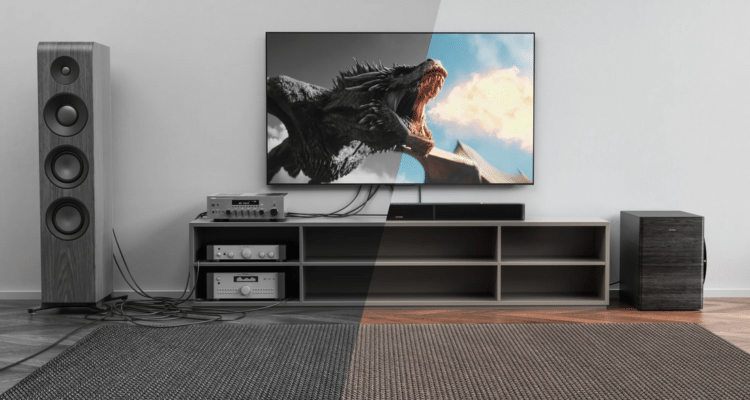
A home theater system typically includes an AV receiver or amplifier, several speakers, and sometimes one or more subwoofers.
A common configuration is 5.1 surround sound, which uses five main speaker channels and one subwoofer channel. Larger systems may include additional speakers for more immersive sound.
These systems offer greater flexibility because individual speakers, cables, and other components can often be tested or replaced separately.
The trade-off is complexity. More connections, components, and configuration settings create additional opportunities for problems.
2. Common Soundbar Problems That May Require Repair
Soundbars are convenient, but their compact design does not make them immune to technical faults.
Soundbar Has No Sound
A soundbar that powers on but produces no audio may have an incorrect input setting, a faulty HDMI connection, an audio-format compatibility issue, or an internal electronic fault.
Start by checking the television’s audio output settings and confirming that the soundbar is set to the correct input. Disconnect and reconnect the HDMI or optical cable, then test another compatible source if possible.
If the soundbar remains silent across different inputs, the problem may involve its amplifier, power supply, or internal circuitry.
Soundbar Keeps Disconnecting
Some soundbars rely on HDMI ARC or eARC, optical connections, Bluetooth, or Wi-Fi. Connection problems may occur because of damaged cables, incorrect settings, wireless interference, or software issues.
If the problem occurs only with one television or streaming device, investigate the connection and settings before assuming the soundbar is defective.
If multiple sources experience the same issue, further testing may be necessary.
Distorted or Crackling Audio
Distortion can result from excessive volume, poor source quality, loose connections, damaged speaker drivers, or amplifier problems.
Reduce the volume and test different content. If the distortion disappears at lower levels, the system may have been overloaded.
Persistent crackling at normal listening levels may indicate a damaged speaker, failing electronic component, or internal connection problem.
Soundbar Subwoofer Stops Working
Wireless subwoofers may lose their connection to the main soundbar. Other causes include incorrect settings, power supply faults, damaged cables, or a failed amplifier.
Follow the manufacturer’s pairing procedure and confirm that both devices are powered correctly. If the subwoofer is wired, inspect the connection for visible damage.
If pairing repeatedly fails despite following the instructions, professional diagnosis may help identify whether the issue lies with the wireless circuitry or the subwoofer itself.
3. Common Home Theater System Repair Issues
Home theater systems contain more separate components than soundbars. This can make troubleshooting more involved, but it also allows technicians to isolate certain faults.
AV Receiver Has No Power
The receiver manages audio signals, amplification, and often video connections. If it fails to power on, the cause may involve the power cord, outlet, internal fuse, power supply, or protection circuitry.
Check the outlet and power connection first. If the receiver shuts down immediately or displays a protection warning, avoid repeatedly restarting it.
Protection circuits may activate when the receiver detects excessive current, overheating, or a possible speaker-wire short. A persistent warning requires investigation rather than repeated power cycling.
One Speaker Is Not Working
When one speaker produces no sound, possible causes include a loose wire, incorrect receiver settings, a damaged speaker, or a failed amplifier channel.
Inspect accessible speaker connections while the equipment is switched off. Confirm that the receiver’s channel settings are correct and that the affected speaker has not been accidentally disabled.
If you are comfortable following the equipment manual, you can compare results using a known-good cable or compatible speaker. Switch off the receiver before changing connections, and never allow bare speaker wires to touch each other.
If the same receiver channel remains silent, the fault may be inside the receiver.
Surround Sound Is Missing
A home theater system may produce sound from the front speakers while the rear or height channels remain silent.
This does not always indicate hardware failure. The source may contain stereo audio instead of a surround format, the receiver may be configured incorrectly, or the speaker levels may be too low.
Check the audio format, speaker configuration, and channel test function. If the receiver’s test tone also fails to reach a particular speaker, investigate its cable, speaker, and amplifier channel.
Subwoofer Produces Weak or No Bass
A subwoofer may stop producing bass because of incorrect crossover settings, a loose connection, a disabled output, a damaged driver, or a faulty amplifier.
Confirm that the subwoofer is switched on and that its volume and crossover controls are set appropriately. Check the receiver’s bass-management settings and ensure the subwoofer output is enabled.
If the system has a wired subwoofer, inspect its cable. For powered subwoofers, persistent silence may indicate an internal amplifier or power supply fault.
4. Soundbar vs Home Theater System: Repair Comparison
The following table summarizes common repair considerations for both systems.
| Repair Consideration | Soundbar | Home Theater System |
|---|---|---|
| Number of components | Usually fewer, with most electronics in one enclosure | More components, including receiver, speakers, and cables |
| No sound | May involve input settings, internal amplifier, or power supply | May involve receiver settings, speaker wiring, individual speakers, or amplifier channels |
| Connectivity problems | HDMI, Bluetooth, Wi-Fi, or wireless subwoofer pairing | HDMI, receiver inputs, speaker connections, network settings, and source devices |
| Speaker replacement | Internal drivers may require model-specific parts | Individual speakers can often be replaced separately |
| Troubleshooting | Often simpler initially, but internal faults can be difficult to isolate | More testing is required because of the additional components |
| Parts availability | Depends on the model and manufacturer | Varies by receiver, speaker, and component age |
| Upgrade flexibility | Usually limited, especially with proprietary wireless systems | Generally greater because components can be upgraded separately |
| Repair decision | Depends on the fault, parts cost, and unit value | Depends on which component has failed and whether it can be repaired independently |
Neither type of system is always cheaper to repair. A soundbar with a failed mainboard may be uneconomical to fix, while a home theater system with one damaged cable may need only a simple replacement.
Similarly, a complicated receiver fault can cost more to diagnose and repair than a basic soundbar connection problem.
5. Which System Is Easier to Troubleshoot?
A soundbar is usually easier for an owner to check because it has fewer connections and a simpler setup.
For example, if a soundbar has no sound, you can verify the input, test the HDMI cable, check the television settings, and restart the devices.
A home theater system requires additional checks. You may need to inspect the receiver’s input selection, speaker assignments, channel levels, crossover settings, individual cables, and source audio format.
However, having separate components can make some home theater repairs more straightforward.
If one speaker fails, the remaining speakers may still work. A technician can often test the affected speaker separately from the receiver. With an integrated soundbar, a fault involving the main electronics may affect the entire unit.
The key difference is not simply repair difficulty, but how easily the faulty component can be identified and accessed.
6. Repair Costs: What Affects the Final Price?
The cost of repairing either system depends on several factors. Without diagnosing the equipment, it is difficult to provide a reliable estimate.
Type of Fault
A damaged cable or incorrect setting may require little or no repair expense. An internal amplifier, power supply, or mainboard fault may involve more labour and replacement parts.
Availability of Replacement Parts
Older or discontinued models may require parts that are difficult to obtain. Some manufacturers do not supply individual internal components, making repairs less practical.
Home theater systems may offer more replacement options because separate speakers and cables are often interchangeable with compatible equipment.
Labour and Diagnostic Time
A straightforward problem can be identified quickly, while intermittent faults may take longer to diagnose.
For example, a receiver that shuts down only after becoming warm may require more extensive testing than a speaker with a visibly damaged cable.
Age and Overall Condition
Repairing one component may not be worthwhile if several other parts are already deteriorating.
Consider the system’s age, performance, remaining useful life, and cost of a suitable replacement before approving an expensive repair.
For residents comparing Audio repair Saskatoon options, explaining the symptoms, equipment model, and troubleshooting already attempted can help a technician assess the next steps.
7. Should You Repair or Replace Your Soundbar?
Repairing a soundbar can make sense when the unit is relatively new, the fault is limited, or the model offers features that would be expensive to replace.
Consider repair when:
- The problem involves a connection or replaceable cable.
- The soundbar has a useful feature set that still meets your needs.
- Replacement parts are available at a reasonable cost.
- The repair estimate is substantially lower than buying a comparable unit.
Replacement may be more practical if the mainboard or amplifier has failed and the repair approaches the cost of a new soundbar with similar features.
Before making a decision, check the warranty. Opening the enclosure yourself may affect warranty coverage, depending on the manufacturer’s terms and applicable consumer protections.
8. Should You Repair or Replace a Home Theater System?
A home theater system may be worth repairing because its individual components can often be evaluated separately.
For example, a damaged speaker does not necessarily mean you need to replace the receiver and all the other speakers.
Repair may be sensible if the receiver remains compatible with your television and audio sources, the speakers are in good condition, and the fault is limited to one component.
Replacement or upgrading may be worth considering when the receiver lacks important features, multiple components have failed, or repair costs are high relative to the system’s value.
Before replacing an entire setup, determine whether a single speaker, cable, subwoofer, or receiver is responsible for the problem.
If the rest of the equipment works well, replacing only the faulty component may be a more economical solution.
9. Safe Troubleshooting Before Calling a Technician
You can perform several basic checks without opening the equipment.
- Check the power supply: Confirm that the outlet works and that power cables are connected securely.
- Verify the input: Ensure the television, soundbar, or receiver is using the correct input.
- Inspect external cables: Look for visible damage, loose connectors, or bent plugs.
- Review audio settings: Confirm the correct output device and compatible audio format.
- Restart the equipment: Switch off the system and follow the manufacturer’s instructions for restarting it.
- Test another source: Determine whether the fault affects one device or every connected source.
- Check ventilation: Make sure air vents are not blocked and the equipment has adequate space around it.
Stop using the equipment if you notice smoke, a burning smell, sparks, liquid damage, or unusual overheating. Unplug it if safe to do so, and do not open the enclosure.
Receivers and other powered audio equipment can contain components that retain hazardous electrical charges after disconnection. Internal repairs should be handled by someone with the appropriate training.
10. Choosing Professional Audio Repair in Saskatoon
When basic troubleshooting does not resolve the issue, professional diagnosis can help prevent unnecessary part replacements.
Before arranging a repair, prepare the following information:
- The brand and model of the soundbar, receiver, or home theater system.
- A clear description of the problem.
- Whether the fault occurs continuously or intermittently.
- Any warning lights, error messages, or unusual noises.
- The connections and devices involved.
- The troubleshooting steps you have already tried.
Ask whether a diagnostic fee applies, whether replacement parts are available, and whether the repair includes testing the equipment after servicing.
A useful repair assessment should explain the likely cause, the proposed solution, and the estimated cost. If replacement appears more economical, compare the cost of a new system with similar features rather than choosing solely by price.
In Saskatoon, local service can also make it easier to discuss equipment drop-off, transportation, and follow-up testing. Transport speakers and soundbars in suitable packaging, and protect receiver controls, connectors, and exposed speaker drivers from impact.
Conclusion
Soundbars and home theater systems both improve television and music listening, but they present different repair challenges.
Soundbars generally offer simpler setups and fewer external connections. However, an internal fault can affect the entire unit, and some models rely on proprietary components.
Home theater systems have more connections and settings to troubleshoot, but their separate speakers, subwoofers, and receivers can often be tested and repaired individually.
Before buying replacement equipment, check the connections, settings, cables, and power supply. If the problem persists, a professional diagnosis can help you compare the likely repair cost with the value of your existing system.
By understanding the differences between these systems, you can make a more informed decision and keep your audio equipment performing reliably for longer.
Frequently Asked Questions
1. Is a soundbar easier to repair than a home theater system?
A soundbar is often easier to troubleshoot because it has fewer external components. However, internal faults can be difficult to repair if replacement parts are unavailable. Home theater systems require more testing but allow individual components to be repaired separately.
2. Why does my soundbar turn on but produce no sound?
Possible causes include incorrect input settings, HDMI connection problems, television audio settings, or an internal amplifier fault. Test the connections and another audio source before arranging a repair.
3. Why does my home theater receiver keep shutting down?
Overheating, blocked ventilation, shorted speaker wires, excessive electrical load, or an internal fault can trigger protection circuitry. If the receiver repeatedly shuts down, stop restarting it and arrange a diagnosis.
4. Can I replace one speaker in a home theater system?
Often, yes. The replacement speaker must be compatible with the receiver and suitable for the system’s configuration. Matching important specifications and maintaining a balanced sound can help preserve performance.
5. Is it worth repairing an old soundbar?
It depends on the repair cost, availability of parts, overall condition, and price of a comparable replacement. Minor connection faults may be worth fixing, while expensive mainboard repairs may not be economical.
6. Why is my home theater subwoofer not producing bass?
The cause may be incorrect receiver settings, a loose cable, a disabled subwoofer output, a wireless pairing problem, or a failed internal amplifier. Check the settings and connections before assuming the subwoofer is damaged.
7. Can a faulty HDMI cable affect sound quality?
Yes. A damaged or incompatible HDMI connection can cause audio dropouts, loss of sound, or connection problems. Testing with a suitable, known-good cable can help determine whether the cable is responsible.
8. How can I prevent my audio equipment from overheating?
Keep vents clear, allow adequate airflow, avoid stacking equipment in a confined space, and follow the manufacturer’s ventilation recommendations. Switch off equipment and seek help if it becomes unusually hot.
9. Should I repair my receiver or buy a new one?
Compare the repair estimate with the price and features of a suitable replacement. Repair may be sensible when the receiver still meets your needs and the fault is limited. Replacement may be better if repair costs are high or the unit lacks essential features.
10. Where can I get audio equipment checked in Saskatoon?
Start by identifying the equipment model and recording its symptoms. You can explore professional service options through the Audio repair Saskatoon page at Hi-Tek Electronics Repair and ask about diagnosis, repair availability, and estimated costs.
SEO Details
SEO Title: Soundbar vs Home Theater System: Repair Guide
Meta Description: Compare soundbar and home theater system repairs, troubleshoot common audio problems, understand repair costs, and learn when to seek professional help in Saskatoon.
URL Slug: soundbar-vs-home-theater-system-repair
Target Keyword: Audio repair Saskatoon
Target Location: Saskatoon, Saskatchewan, Canada
Refine the article further