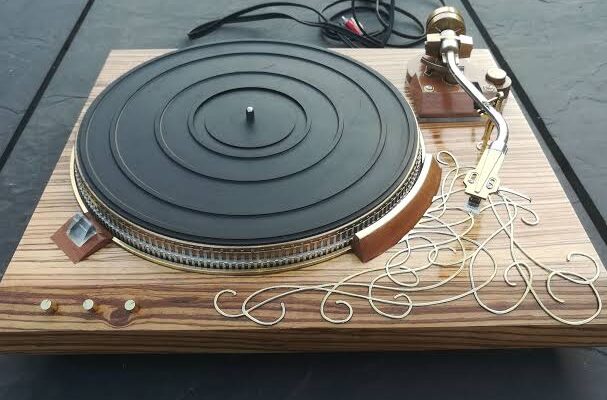
Vintage record players have a special appeal for music lovers. They offer a warm listening experience, a classic design, and a connection to the history of recorded music. Whether you have inherited an old turntable from a family member or found a vintage record player at a second-hand shop, restoring it can be a rewarding project.
However, older record players may develop problems after years of use or storage. The platter might stop spinning, the sound may become distorted, or the tonearm may fail to track records correctly. Dust, worn-out parts, damaged wiring, and dried lubrication can all affect performance.
The good news is that many common problems can be diagnosed and repaired. Some require only careful cleaning and basic adjustments, while others need replacement components or professional attention.
This guide explains how to inspect, clean, troubleshoot, and restore an old record player safely, helping you decide which repairs you can handle yourself and when to seek expert assistance in Saskatoon.
Why Restore an Old Record Player?
Restoring a vintage record player can offer several benefits beyond its appearance.
Preserve a Piece of Musical History
Older record players often feature designs, materials, and mechanical components that are no longer common in modern equipment. Restoring one allows you to preserve a useful piece of audio history instead of discarding it.
Some vintage models are also valued by collectors, particularly when they retain their original components and distinctive design.
Enjoy Vinyl Records Again
A properly maintained record player can deliver enjoyable sound when paired with suitable records, speakers, and audio equipment. You do not necessarily need an expensive modern turntable to appreciate vinyl.
However, the condition of the stylus, cartridge, tonearm, and drive system can significantly affect playback quality.
Save Money Through Targeted Repairs
A record player that appears completely broken may have a relatively simple fault, such as a loose belt, dirty switch, or incorrect tracking adjustment.
Diagnosing the problem before replacing the entire unit can help you avoid unnecessary expenses. Nevertheless, restoration costs should be considered carefully, especially if the player requires several expensive or hard-to-find parts.
Step 1: Identify Your Record Player and Its Condition
Before starting any repair, identify the make, model, and approximate age of your record player.
Look for a manufacturer’s label on the underside, back panel, or base. If the model number is missing, photographs of the controls, tonearm, platter, and cabinet may help you identify the equipment.
Once you know the model, check whether a service manual is available. A manual may provide important information about lubrication points, belt sizes, cartridge compatibility, adjustment procedures, and electrical specifications.
Inspect the Exterior
Examine the cabinet, hinges, dust cover, controls, and platter for visible damage.
Look for:
- Cracked or warped plastic parts.
- Rust on metal components.
- Loose knobs or switches.
- Missing screws or feet.
- Damaged hinges and dust covers.
- Signs of moisture exposure.
- Frayed or damaged power cables.
A damaged cabinet may be mainly cosmetic, but corrosion, moisture, and deteriorating wiring can indicate more serious problems.
Check Whether Parts Are Missing
Confirm that the platter, platter mat, counterweight, cartridge, stylus, and other essential components are present.
Some record players use proprietary parts that are difficult to replace. Check parts availability before spending money on restoration.
Step 2: Clean the Record Player Carefully
Cleaning is often one of the most important steps in restoring old audio equipment. Dust and grime can interfere with moving parts, while accumulated dirt around switches and connectors may contribute to unreliable operation.
Always unplug the record player before cleaning it. Never spray cleaning products directly into the unit.
Clean the Cabinet and Dust Cover
Use a soft microfiber cloth to remove loose dust. For suitable exterior surfaces, a slightly damp cloth may help remove stubborn marks.
Avoid soaking wooden cabinets or using harsh chemicals on plastic dust covers. Abrasive materials can scratch clear plastic, while excessive moisture can damage wood veneer.
For valuable or delicate finishes, test any cleaning method on a small, inconspicuous area first.
Clean the Platter and Mat
Remove the platter mat if the design allows it. Clean the mat according to its material and condition.
A rubber mat may benefit from gentle cleaning with a suitable, lightly dampened cloth. Allow it to dry completely before reinstalling it.
If the platter is removable, follow the manufacturer’s instructions. Do not force a platter that appears stuck, because doing so may damage the spindle or drive mechanism.
Clean the Stylus
The stylus, commonly called the needle, is responsible for following the grooves of a record. Dirt or damage can affect sound quality and potentially harm vinyl.
Use a stylus brush designed for record players. Brush gently in the direction recommended by the manufacturer, usually from the back of the cartridge toward the tip.
Never push sideways against the stylus or use household cleaning tools. If the needle is bent, chipped, or badly worn, replace it rather than attempting to repair it.
Step 3: Fix a Record Player That Will Not Spin
A platter that does not rotate is one of the most common problems with older turntables. The cause depends partly on whether the player uses a belt-drive, direct-drive, or idler-wheel system.
Inspect the Drive Belt
Belt-drive turntables use a rubber belt to transfer motor movement to the platter.
Over time, the belt can stretch, become brittle, slip off, or break. If the motor runs but the platter does not spin properly, a worn belt may be responsible.
To inspect it:
- Unplug the player.
- Remove the platter according to the manual.
- Examine the belt for stretching, cracking, or deterioration.
- Check the motor pulley and platter’s belt surface for residue.
- Install a compatible replacement belt if needed.
Use the correct belt size and type. An unsuitable belt may cause slow playback, unstable speed, or excessive strain on the motor.
Check the Motor
If the platter does not spin and the motor makes no sound, the fault may involve the power supply, switch, wiring, or motor itself.
If the motor runs but the platter remains stationary, the drive mechanism may be slipping or obstructed.
Avoid applying random oils or lubricants to the motor. Some motors require specific lubrication, while others are designed to operate without additional oil.
Inspect Idler Wheels and Direct-Drive Systems
Some vintage record players use a rubber idler wheel to transfer motion from the motor to the platter. Rubber can harden or become misshapen with age, reducing traction.
Direct-drive turntables use a motor system connected more directly to the platter. Their faults may involve electronic speed control, sensors, motor components, or circuit boards.
These systems can require model-specific procedures, so professional diagnosis may be worthwhile when basic checks do not solve the problem.
Step 4: Troubleshoot Poor Sound Quality
A record player may spin normally but still produce weak, distorted, or uneven sound.
Several components can contribute to these problems.
Replace a Worn Stylus
A worn stylus can cause distortion, reduced detail, skipping, and excessive record wear. If the stylus age is unknown, replacing it may be sensible before playing valuable records.
Choose a compatible replacement for the cartridge. Not every stylus fits every cartridge, even if the components look similar.
Check the Cartridge and Tonearm
The cartridge converts the stylus’s movement into an electrical signal. A damaged cartridge, loose mounting, or incorrect alignment can affect sound quality.
Check that the cartridge is securely attached and that its connections are not visibly damaged.
The tonearm must also move freely and track the record at the correct force. If the tracking force is too high or too low, the stylus may skip, distort the sound, or damage records.
Use the manufacturer’s recommended tracking force and alignment procedure rather than guessing.
Inspect the Audio Cables
Older record players may have RCA output cables or fixed audio leads. Damaged insulation, loose plugs, and corroded connectors can cause humming, crackling, or sound loss.
With the player disconnected, inspect the cables for visible damage. Check that the connectors fit securely into the amplifier or receiver.
If the sound disappears when a cable moves, the connection may be damaged internally. Avoid repeatedly bending a faulty cable, as this can make the problem worse.
Check the Phono Input
Many turntables produce a low-level signal that requires a phono preamplifier.
If your amplifier has a dedicated PHONO input, connect the turntable as instructed by the manufacturer. If it uses a LINE output or an external phono preamplifier, follow the appropriate connection method.
Connecting a turntable directly to an unsuitable input can result in very quiet sound or incorrect tonal balance.
Step 5: Reduce Humming, Buzzing, and Crackling
Unwanted noise can make restored record players frustrating to use.
Check the Ground Connection
Some turntables have a separate grounding wire that connects to the amplifier or phono preamplifier. A missing or loose ground connection may cause a noticeable hum.
If your model has a grounding wire, connect it according to the manual. Not every turntable uses the same grounding arrangement, so do not add improvised connections.
Clean Suitable Contacts
Dirty switches and connectors can cause intermittent sound or crackling. However, internal electrical contacts should only be cleaned with products suitable for the specific component.
Do not spray general-purpose lubricant into switches or circuit boards. Incorrect products can leave residue or damage sensitive parts.
Separate Audio Cables From Power Cables
Where practical, keep audio cables away from power adapters and other equipment that may introduce interference.
If the noise changes when nearby devices are switched off, electrical interference may be contributing to the issue.
If humming continues after these checks, the cause may be an internal grounding fault, damaged wiring, or a problem with the amplifier.
Step 6: Restore the Tonearm and Automatic Mechanism
Some older record players include automatic functions that lower the tonearm, return it at the end of a record, or change records automatically.
These mechanisms can become unreliable when old grease hardens or moving parts become dirty.
Check Tonearm Movement
With the player unplugged and the stylus protected, inspect the tonearm for visible damage and confirm that it is not obstructed.
Do not force the arm through its movement. Delicate bearings and internal linkages can be damaged by excessive pressure.
Investigate Automatic Functions
If the tonearm fails to lower, return, or move correctly, the problem may involve the cueing mechanism, hardened lubricant, a worn component, or incorrect adjustment.
Automatic record changers can be especially complicated because several mechanical parts must work together in the correct sequence.
Cleaning and lubrication may help, but use only the specified lubricant and apply it to the correct points. If the mechanism requires extensive disassembly, professional servicing is often safer.
Step 7: Know When Professional Repair Is Necessary
Basic cleaning and some belt replacements are manageable for people who are comfortable working with delicate equipment. More complicated faults should be assessed by a qualified technician.
Seek professional help if you notice:
- Burning smells or smoke.
- Sparks or signs of electrical damage.
- A damaged power cord or plug.
- Persistent electrical humming.
- A motor that overheats.
- A platter that remains slow after basic checks.
- Internal circuit-board faults.
- A broken tonearm or damaged bearings.
- Automatic mechanisms that repeatedly jam.
- Problems requiring specialist soldering or calibration.
Never open or work on a powered record player. Some equipment can contain hazardous electrical voltages, and capacitors may retain a charge after the unit is unplugged.
For people looking for Audio repair Saskatoon, a professional assessment can help identify the fault, determine whether replacement parts are available, and establish whether restoration is economically sensible.
Step 8: Is Restoring an Old Record Player Worth the Cost?
The value of restoration depends on the model, condition, repair requirements, and your intended use.
A basic vintage turntable with a worn belt may be inexpensive to restore. A high-quality model with a damaged motor, broken tonearm, or discontinued electronic components may require more time and money.
Before approving a repair, consider the following:
Replacement-part availability: Common belts and compatible styli may be easy to find, while proprietary parts can be difficult to source.
Labour costs: Complex mechanical restoration takes longer than routine cleaning or a simple component replacement.
Collector value: A rare model may justify specialist restoration, especially if original parts can be preserved.
Everyday performance: If you mainly want a reliable turntable for regular listening, compare restoration costs with the price of a suitable replacement.
Condition of the records: A damaged stylus or incorrectly adjusted tonearm can harm vinyl, so restoring safe tracking is more important than making the unit look new.
Ask for a diagnosis and estimated cost before committing to extensive repairs. Where possible, request that original components be retained if they are still usable.
Step 9: Maintain Your Restored Record Player
Once your record player is working correctly, regular maintenance can help preserve its performance.
Follow these habits:
- Keep the dust cover closed when the player is not in use.
- Store records vertically and protect them from dust.
- Clean records with appropriate vinyl-cleaning products.
- Brush the stylus carefully as recommended by its manufacturer.
- Avoid touching the stylus tip.
- Keep the turntable on a stable, level surface.
- Protect the equipment from moisture and excessive heat.
- Check belts and cables periodically for signs of wear.
- Follow the service manual for lubrication and adjustment.
- Avoid playing records with a visibly damaged stylus.
If you need to move the turntable, secure the tonearm as directed, remove loose accessories, and protect the dust cover. For models with removable platters or counterweights, follow the manufacturer’s transport instructions.
In Saskatoon, protecting vintage audio equipment from moisture and temperature extremes is also sensible, particularly when moving it between a cold vehicle and a warm indoor environment. Allow equipment to reach room temperature before using it if condensation may have formed.
Conclusion
Restoring an old record player can bring a cherished piece of audio equipment back to life. With careful inspection, gentle cleaning, correct replacement parts, and proper adjustment, many common problems can be resolved without replacing the entire unit.
Start with straightforward checks, such as inspecting the belt, cleaning the stylus, and examining the audio connections. Avoid forcing delicate mechanisms or attempting electrical repairs without the necessary training.
If the player has serious mechanical or electrical problems, a professional diagnosis can help you understand the repair options and likely costs. With suitable maintenance and responsible handling, a restored record player can continue providing enjoyable listening for years.
Frequently Asked Questions
1. Can an old record player be repaired?
Yes. Many old record players can be repaired. Common repairs include replacing belts and styli, cleaning mechanical parts, repairing cables, and servicing motors. The best solution depends on the model and the condition of its components.
2. Why does my vintage record player not spin?
Possible causes include a broken or stretched belt, a damaged idler wheel, a faulty motor, a power issue, or an obstructed mechanism. Unplug the player before inspecting accessible parts.
3. Is it worth restoring a vintage turntable?
Restoration may be worthwhile if the turntable has sentimental or collector value, offers good performance, or needs only minor repairs. Compare the estimated repair cost with the price of a suitable replacement before deciding.
4. How do I know if a record player stylus needs replacing?
Warning signs include persistent distortion, skipping, visible stylus damage, and an unknown or excessive period of use. Because a worn stylus can damage records, replace it when necessary with a compatible model.
5. Why does my record player make a humming noise?
Humming may result from grounding problems, damaged audio cables, electrical interference, or faults in the turntable or amplifier. Check the connections and grounding arrangement recommended by the manufacturer.
6. Can I replace a record player belt myself?
Many belt-drive turntables allow straightforward belt replacement. Use the correct belt for your model and follow the service instructions. Incorrect belt dimensions can affect playback speed and stability.
7. Why does my record player sound slow?
A stretched belt, worn idler wheel, motor problem, or incorrect speed setting can cause slow playback. Check the selected speed and accessible drive components before arranging further repairs.
8. Do vintage record players need special maintenance?
They benefit from regular dust removal, careful stylus cleaning, proper storage, and occasional inspection of belts and cables. Lubrication and internal servicing should follow the manufacturer’s recommendations.
9. Can a damaged record player harm my vinyl records?
Yes. A worn or damaged stylus, incorrect tracking force, or faulty tonearm can scratch records or wear their grooves. Stop playback if the stylus is visibly damaged or the tonearm tracks abnormally.
10. Where can I get help with record player problems in Saskatoon?
Start by identifying the make and model and describing the symptoms. For professional assistance with vintage turntables and other audio equipment, visit Audio repair Saskatoon to explore the available service options.
SEO Details
SEO Title: Restoring Old Record Players: A Complete Repair Guide
Meta Description: Learn how to restore an old record player, troubleshoot spinning and sound problems, replace worn parts, and maintain vintage audio equipment in Saskatoon.
URL Slug: restoring-old-record-players-repair-guide
Target Keyword: Audio repair Saskatoon
Target Location: Saskatoon, Saskatchewan, Canada
Refine the record player article