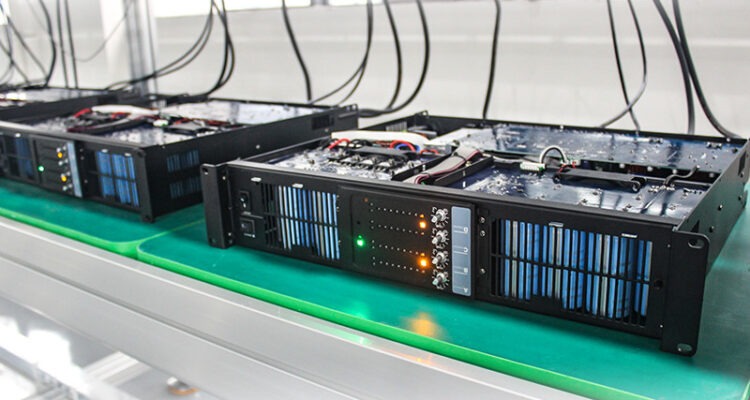
An amplifier is an essential part of a home audio system. It strengthens audio signals and sends them to your speakers, helping you enjoy music, movies, television, and other entertainment with clear, balanced sound. When an amplifier develops a fault, the entire listening experience can suffer.
You might notice distorted music, unexpected shutdowns, unusual humming, overheating, or no sound at all. While some problems result from simple connection issues or incorrect settings, others point to internal electrical faults that require professional attention.
Knowing the difference can help you avoid unnecessary expenses and protect your equipment from further damage.
For homeowners and music lovers in Saskatoon, Saskatchewan, understanding the warning signs of amplifier failure is a useful first step towards making an informed repair decision. This guide covers common amplifier problems, safe troubleshooting methods, repair considerations, and situations where professional help is recommended.
1. Distorted or Crackling Sound
One of the earliest warning signs of amplifier trouble is a noticeable change in audio quality.
Music that once sounded clear may become harsh, crackling, muffled, or distorted. You might hear the problem during loud passages or notice that the sound becomes worse when you increase the volume.
Distortion can have several causes, so it is important not to assume that the amplifier is automatically faulty.
Common causes of distorted sound
- Damaged speaker cables or loose connections.
- A faulty speaker driver.
- Excessive volume causing audio clipping.
- Incorrect gain or equaliser settings.
- An overheating amplifier.
- A damaged internal amplifier circuit.
What can you do?
Start by lowering the volume and checking the audio settings. Try another song or audio source to determine whether the problem affects everything you play.
Switch off the amplifier before inspecting its external connections. Look for loose speaker wires, damaged cables, or exposed copper strands that could touch neighbouring terminals.
If distortion continues with different sources and suitable speakers, the amplifier may require professional diagnosis.
Avoid operating equipment that produces severe distortion, especially if it also becomes unusually hot or emits a burning smell.
2. The Amplifier Keeps Shutting Down
An amplifier that switches itself off unexpectedly may be experiencing overheating, a short circuit, excessive electrical demand, or an internal component fault.
Many modern amplifiers include protection circuits designed to shut down the unit when potentially damaging conditions are detected. Although this feature can protect the equipment, repeated shutdowns should not be ignored.
Why does an amplifier shut down?
Overheating: Poor ventilation, dust accumulation, or prolonged operation at high output levels can cause excessive heat.
Speaker wiring faults: A short circuit involving the speaker wires may trigger the amplifier’s protection system.
Speaker compatibility problems: Speakers with an impedance below the amplifier’s supported range can place excessive demand on its output circuits.
Internal electrical faults: Problems involving the power supply or amplifier circuitry can cause unstable operation.
When should you seek professional help?
Check that the amplifier has enough space for ventilation and that the external speaker connections are secure. Consult the manufacturer’s instructions to confirm that the connected speakers are compatible.
If the amplifier continues shutting down, stop using it until the cause has been identified.
Repeatedly switching it back on may worsen an existing fault. A qualified technician can test the equipment and determine whether the problem involves wiring, overheating, power delivery, or an internal component.
3. Excessive Heat During Normal Operation
Amplifiers naturally generate heat while working, particularly when driving speakers at high volumes. However, excessive heat during ordinary listening can indicate a problem.
An amplifier that becomes unusually hot may have restricted airflow, an unsuitable speaker load, or a failing internal component.
Warning signs of overheating
Watch for these symptoms:
- The amplifier becomes extremely hot.
- Sound cuts out after the unit warms up.
- The device repeatedly shuts down.
- A burning smell comes from the casing.
- Performance becomes unreliable during longer listening sessions.
How to prevent overheating
Place your amplifier on a stable surface with adequate space around its ventilation openings.
Avoid placing it in a tightly enclosed cabinet or stacking other equipment directly on top of it unless the manufacturer permits this arrangement.
Keep the ventilation openings clear and follow the manufacturer’s instructions for external cleaning.
If the amplifier remains excessively hot despite adequate airflow, switch it off and arrange an inspection.
A burning smell, smoke, or melted insulation requires immediate caution. Disconnect the power if it is safe to do so, and do not restart the equipment before it has been assessed.
4. No Sound From the Speakers
An amplifier that powers on but produces no sound can be frustrating. The cause may be a simple setting or an internal electronic fault.
Before arranging a repair, check whether the issue involves the amplifier or another part of the audio system.
Basic checks to perform
- Confirm that the amplifier is switched on.
- Check the volume and mute settings.
- Select the correct input source.
- Confirm that the connected device is playing audio.
- Inspect accessible audio and speaker cables.
- Check the speaker configuration in the equipment settings.
If your amplifier supports multiple inputs, try another compatible source. This can help establish whether the problem is limited to one device or affects the amplifier more generally.
If there is still no sound after these checks, the problem may involve an internal connection, power supply, or output circuit.
Do not open the amplifier to inspect internal components unless you have appropriate training. Some components can retain dangerous electrical charges even after the unit has been unplugged.
5. Humming, Buzzing, or Unusual Noise
A persistent humming or buzzing sound can interfere with music and make an audio system unpleasant to use.
The noise may originate from the amplifier, connected cables, speakers, or another electronic device.
What causes amplifier hum?
Ground-loop interference: Multiple connected devices can sometimes create grounding issues that introduce low-frequency hum.
Poor cable connections: Loose or damaged audio cables can allow interference into the signal path.
Electrical interference: Nearby electrical equipment may affect sensitive audio connections.
Power supply problems: A faulty internal power supply can produce abnormal noise.
Ageing components: Worn or damaged electronic components may contribute to persistent buzzing.
How to investigate the noise
Lower the volume and check whether the noise changes when you select a different input.
Switch off the equipment before inspecting or changing external connections. Confirm that cables are connected correctly and show no visible damage.
If you suspect interference from another device, consult the equipment manuals before changing the setup.
Never remove a protective earth connection or use unsafe adapters to eliminate humming.
If the noise persists across different inputs and correctly connected cables, professional diagnosis may be necessary.
6. One Audio Channel Stops Working
If sound comes from only the left or right speaker, the amplifier may have a faulty output channel. However, damaged speaker wires, incorrect balance settings, or a defective speaker can produce similar symptoms.
The goal is to determine whether the problem follows the speaker, cable, source, or amplifier channel.
Signs of a possible amplifier channel fault
- One speaker remains silent.
- One side sounds quieter than the other.
- Distortion occurs on only one channel.
- Sound disappears intermittently from one speaker.
- The problem affects multiple audio sources connected to the same amplifier.
First, check the balance settings and inspect the external speaker connections with the amplifier switched off.
If you are comfortable doing so, you can compare a known-working compatible speaker connection, following the manufacturer’s instructions. Make sure the speaker impedance is suitable for the amplifier.
If the same channel continues to fail, a technician can test the output circuitry and determine whether a repair is needed.
7. The Amplifier Will Not Turn On
An amplifier that does not power on may have an external power problem or an internal electrical fault.
Possible causes include a damaged power cable, a faulty power supply, an internal fuse failure, or another electronic component problem.
What can you check safely?
Confirm that the power cable is connected correctly and that the outlet is working.
If the equipment has a user-accessible power switch, make sure it is in the correct position. Check the manual for information about indicator lights and basic troubleshooting.
Do not repeatedly attempt to power on an amplifier that produces unusual sounds, smells burnt, or shows signs of electrical damage.
If the external power connections are working normally but the amplifier remains unresponsive, professional inspection is recommended.
Never bypass a fuse or replace an internal fuse with one of a different rating. A fuse is a safety component, and repeated failure may indicate a deeper electrical problem.
8. Burning Smell or Visible Electrical Damage
A burning smell is one of the most serious signs of amplifier trouble.
It may indicate overheating, damaged insulation, a failing electronic component, or another electrical fault. Smoke, melted insulation, or scorched areas also require immediate attention.
What should you do?
Stop using the amplifier immediately.
Disconnect the power if you can do so safely. If there is smoke or a fire risk, keep away from the equipment and follow appropriate emergency procedures.
Do not open the casing to investigate the smell or attempt to repair the internal electronics yourself.
Even if the amplifier appears to work after cooling down, the underlying fault may remain. Arrange a professional assessment before using it again.
Continuing to operate damaged equipment can increase the risk of further component failure and create a potential electrical or fire hazard.
9. Sound Problems That Appear After the Amplifier Warms Up
Some amplifiers work normally when first switched on but develop problems after several minutes.
The sound may become distorted, one channel may disappear, or the unit may shut down.
This behaviour can indicate a temperature-related fault, although other problems may produce similar symptoms.
Possible causes
- A component that becomes unreliable as it heats up.
- Restricted ventilation.
- A failing power supply.
- An intermittent internal connection.
- Excessive electrical demand from connected speakers.
Pay attention to when the problem occurs. Note whether it appears at high volume, after a consistent period of operation, or only with a particular audio source.
This information can help a technician reproduce the fault and diagnose it more efficiently.
If the amplifier repeatedly loses sound or shuts down as it warms up, stop using it until the problem has been assessed.
10. How Much Does Amplifier Repair Cost?
Amplifier repair costs depend on the equipment’s design, the type of fault, replacement-part availability, and the time needed for diagnosis.
A loose external connection may require little work, while a damaged power supply or output circuit can involve more extensive servicing.
Older or specialised amplifiers may also cost more to repair if suitable components are difficult to find.
Before approving any repair, ask the service provider:
- Is there a separate diagnostic fee?
- What is the estimated total repair cost?
- Are replacement parts available?
- How long is the expected turnaround time?
- Does the repair include a warranty?
- Will you receive an estimate before additional work begins?
Compare the repair estimate with the cost of a comparable replacement, rather than simply choosing the least expensive amplifier available.
If your existing equipment delivers the sound quality and connectivity you want, repair may be a sensible investment. If it has multiple serious faults or lacks essential features, replacement may provide better long-term value.
11. DIY Troubleshooting vs Professional Amplifier Repair
Basic external troubleshooting can resolve some amplifier problems. However, there is an important difference between checking settings and attempting internal electrical repairs.
Tasks you can usually perform safely
Following the manufacturer’s instructions, you can often:
- Check volume, mute, and input settings.
- Confirm that external cables are connected correctly.
- Inspect accessible cables for visible damage.
- Improve ventilation around the equipment.
- Test another audio source.
- Check speaker compatibility using the equipment specifications.
Always switch off the amplifier before changing speaker connections.
When professional help is necessary
Seek professional assistance if the amplifier has persistent distortion, repeated shutdowns, excessive heat, a burning smell, or a channel that remains silent after basic checks.
Internal repairs may involve hazardous voltages, delicate electronic components, and specialised testing equipment.
A qualified technician can identify the fault, explain the available options, and help you decide whether repairing the amplifier is worthwhile.
12. Finding Amplifier Repair Services in Saskatoon
If your amplifier continues to malfunction after basic troubleshooting, arranging a professional assessment can help prevent further damage.
When choosing a repair service in Saskatoon, look for relevant experience with your type of equipment, clear communication, transparent estimates, and understandable warranty terms.
Before contacting a service provider, prepare the following information:
- The amplifier’s make and model.
- A description of the symptoms.
- Whether the problem affects one or both channels.
- How long the amplifier operates before the problem appears.
- Any recent electrical events or changes to the setup.
- The troubleshooting steps you have already tried.
For local service information, Audio repair Saskatoon is a useful starting point for exploring repair options for amplifiers and other home audio equipment.
Describe the problem clearly and ask whether the service provider can assess your particular amplifier model. This can help you understand the likely next steps before committing to a repair.
A professional diagnosis is particularly valuable when the amplifier repeatedly shuts down, produces abnormal heat, or displays symptoms that could involve several different components.
Conclusion
Amplifier problems can range from simple connection issues to serious internal electrical faults. Distorted sound, overheating, repeated shutdowns, unusual humming, missing audio channels, and power failures are all warning signs that deserve attention.
Start with safe external checks, such as reviewing audio settings, inspecting cables, and ensuring adequate ventilation. If the problem persists, avoid opening the equipment or repeatedly restarting a malfunctioning unit.
Professional repair may be worthwhile when the amplifier is otherwise in good condition and the fault can be corrected economically. A technician can assess the equipment, explain the repair options, and help you compare repair costs with replacement costs.
For homeowners in Saskatoon, addressing amplifier problems early can help protect valuable audio equipment and restore reliable sound without unnecessary spending.
Frequently Asked Questions
1. What are the most common signs that an amplifier needs repair?
Common warning signs include distorted sound, unexpected shutdowns, excessive heat, humming, a missing audio channel, and failure to power on. Persistent problems after checking external connections may require professional diagnosis.
2. Why does my amplifier produce distorted sound?
Distortion can result from excessive volume, damaged speaker wires, faulty speakers, incorrect settings, or an internal amplifier fault. Testing another source and checking the external connections can help narrow down the cause.
3. Why does my amplifier keep shutting down?
Possible causes include overheating, speaker wiring short circuits, incompatible speaker impedance, or internal component failure. If the amplifier repeatedly shuts down, stop using it until the cause has been identified.
4. Is it normal for an amplifier to get warm?
Some warmth is normal during operation. However, excessive heat, a burning smell, repeated shutdowns, or sound problems after warming up may indicate a fault that requires inspection.
5. Can an amplifier be repaired if one channel stops working?
Often, yes. The cause may be a loose connection, damaged cable, faulty speaker, or failed amplifier channel. A technician can determine whether the problem is repairable and estimate the cost.
6. Why does my amplifier make a humming noise?
Humming may result from ground-loop interference, damaged cables, electrical interference, power supply problems, or internal component faults. If checking the external connections does not help, professional diagnosis may be necessary.
7. Should I repair or replace my old amplifier?
Repair may be worthwhile if the amplifier is in good condition, parts are available, and the repair cost is reasonable. Replacement may be preferable if the equipment has multiple serious faults or no longer meets your needs.
8. Is it safe to open an amplifier at home?
Opening an amplifier can be dangerous because internal components may retain hazardous electrical charges even after unplugging. Internal electrical repairs should be performed by appropriately trained technicians.
9. How much does amplifier repair cost in Saskatoon?
Costs vary according to the model, fault, labour, and replacement parts. Request a diagnosis and an estimate from a local repair service before deciding whether to proceed.
10. When should I stop using a faulty amplifier?
Stop using it if you notice a burning smell, smoke, excessive heat, visible electrical damage, or repeated protection warnings. Disconnect power if it is safe to do so, and arrange a professional assessment before restarting the equipment.
SEO Details
SEO Title: Amplifier Repair in Saskatoon: Warning Signs and Expert Help
Meta Description: Notice distorted sound, overheating, or amplifier shutdowns? Learn the warning signs and explore home audio repair options in Saskatoon.
URL Slug: amplifier-repair-signs-professional-help
Target Keyword: Audio repair Saskatoon
Target Location: Saskatoon, Saskatchewan, Canada
Refine the article further